
Artificial Studio
Transfer artistic styles between images with AI-powered neural style transfer
About Artificial Studio
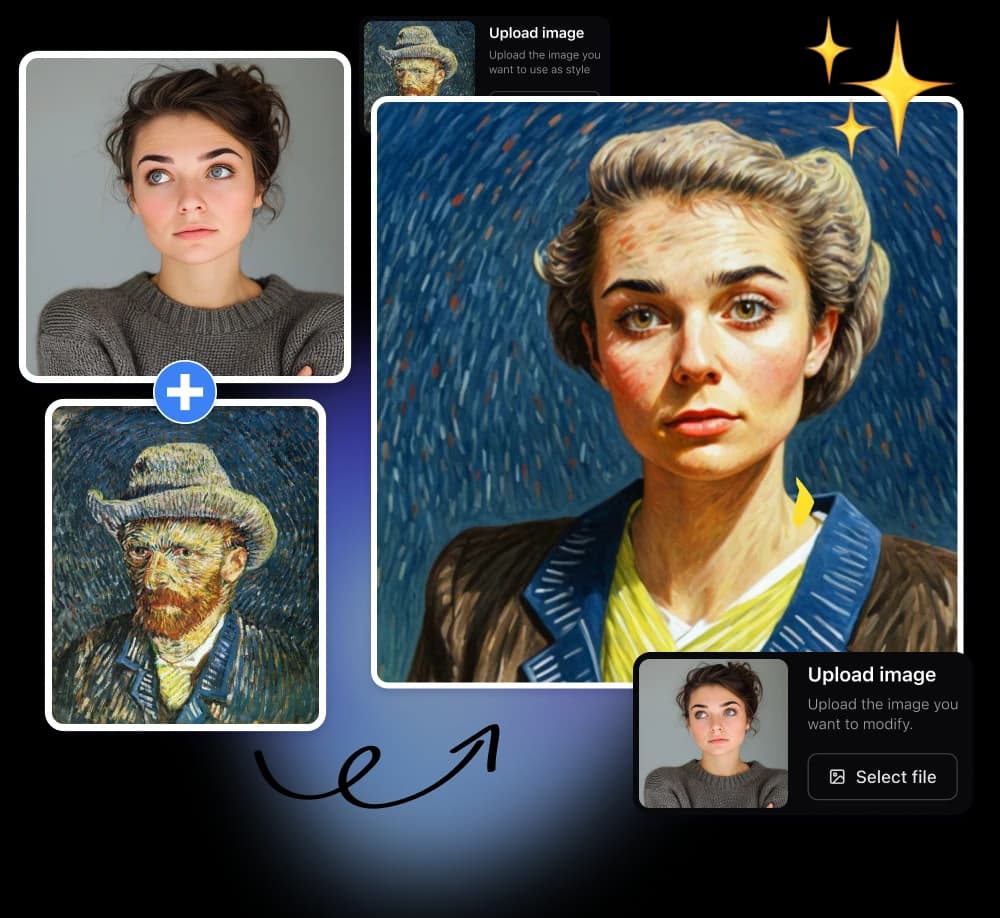
Artificial Studio's Style Transfer is the secret weapon of indie game developers and digital artists. This specialized tool applies the aesthetic of any reference image to your content—transforming photos into Van Gogh paintings, cyberpunk scenes, or Studio Ghibli-inspired artwork.
Creative Possibilities
Upload a portrait and a reference painting; the AI extracts the artistic style—brush strokes, color palette, texture—and applies it to your photo while preserving the original composition. The results are gallery-worthy artistic transformations.
Ideal For Creative Professionals
Game Developers
- Create consistent art styles for indie game assets
- Generate painterly textures for 3D environments
- Produce concept art variations quickly
Content Creators
- Transform photos into unique social media content
- Create album artwork with distinctive aesthetics
- Generate illustrations for blog posts and articles
Designers
- Mock up brand visuals in different artistic directions
- Create portfolio pieces that stand out
- Produce print-ready artwork for merchandise
Developer Integration
Artificial Studio offers robust API access for teams who want to integrate style transfer into their pipelines:
- Automation: Batch process thousands of assets
- Customization: Adjust style intensity and preservation levels
- Scalability: Cloud infrastructure handles high-volume requests
- Pricing: Just 3 credits per transformation (1,250 credits for $10)
Why It Beats Traditional Methods
Unlike mobile apps like Prisma that offer limited presets, Artificial Studio allows any style reference—upload a specific painting, texture, or mood board. The cloud-based processing means no GPU requirements on your end, and results render in seconds rather than hours.
Use It When You Need
- Consistent art direction across game levels
- Quick concept visualization for client pitches
- Unique visual content without hiring illustrators
- Prototyping different aesthetic directions
Pro Tip: For best results, choose style references with clear texture patterns and distinct color schemes. The AI excels at capturing impressionistic brushwork and bold color palettes.